
Ultimo aggiornamento prezzo: Ottobre 9, 2026 3:16 am
×
Product prices and availability are accurate as of the date/time indicated and are subject to change. Any price and availability information displayed on Amazon at the time of purchase will apply to the purchase of this product.
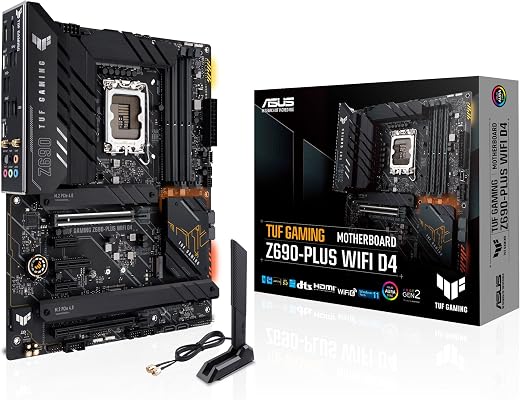
ASUS TUF Gaming Z690-PLUS WIFI D4


332,56€
non disponibile

341,00€
non disponibile
 & Free shipping
329,90€
non disponibile

312,33€
321,99€
non disponibile
- Il socket LGA1700 offre supporto per i nuovi processori Intel Core, Pentium Gold e Celeron di 12th Gen, sfrutta le sue enormi potenzialità per creare il tuo PC gaming da vero professionista
- I quattro slot RAM DDR4 supportano fino a 128GB totali per unâ€esperienza di gioco senza fastidiosi rallentamenti, sfrutta tutto il potenziale della memoria grazie alla tecnologia ASUS OptiMem II
ASUS TUF Gaming Z690-PLUS WIFI D4
Description
- Il socket LGA1700 offre supporto per i nuovi processori Intel Core, Pentium Gold e Celeron di 12th Gen, sfrutta le sue enormi potenzialità per creare il tuo PC gaming da vero professionista
- I quattro slot RAM DDR4 supportano fino a 128GB totali per un’esperienza di gioco senza fastidiosi rallentamenti, sfrutta tutto il potenziale della memoria grazie alla tecnologia ASUS OptiMem II
- Grazie ai dissipatori su chipset, VRM ed M.2 potrai effettuare lunghe sessioni di gioco, abbinala ad un sistema di raffreddamento TUF Gaming AiO e il surriscaldamento sarà solo un ricordo
- La porta LAN Intel 2.5Gb e il WiFi 6 (802.11ax) offrono una connettività veloce ed affidabile per un gameplay fluido e senza lag, TUF LANGuard protegge la porta LAN da fulmini ed elettricità statica
- Connettività gaming infinita grazie al supporto con PCIe 5.0, HDMI 2.1 e Displayport 1.4. Grazie ai quattro slot M.2 e all’USB 3.2 Gen 2×2 potrai godere di caricamenti super veloci
ASUS TUF Gaming Z690-PLUS WIFI D4 Prezzi
312,33€
321,99€
non disponibile

Storico Prezzi
-
Additional information
Specifiche: ASUS TUF Gaming Z690-PLUS WIFI D4
|
Reviews (13)
13 recensioni per ASUS TUF Gaming Z690-PLUS WIFI D4
Vedi tutti
Il più utile
Valutazione più alta
Valutazione più bassa


screwy –
top stuff well done asus!!
Giuseppe Inchingolo –
Sto usando questa mobo con un i7 10700K e una Asus 2070 Super, un Crucial P5 da 1 TB e due banchi di ram Crucial Ballistix da 8 GB 4000 MHz. Per ora sta andando tutto liscio, qualche difficoltà nel configurare tutti i software necessari ma è una cosa che avevo previsto.
peppe –
Sulla scheda non ho nulla da dire. Però mi è stata consegnata con scatola completamente aperta senza sigilli e senza carta d’imballaggio amazon o altro. Quindi non so se è stata danneggiata o se mancano alcuni pezzi …….. Non se neanche se funzionerà appena assemblo il pc vedremo……!
K. R. Phillips –
I’m already a bit an an ASUS fanboy, but I was wanting to upgrade to a Gen 11 Intel in preparation for the release of Win 11 and had been putting it off because of past bad experience moving my Intel RST RAID when switching hardware. I put this board in, plugged every thing in and went into the BIOS. As soon as I turned on the Intel RAID, it picked up my existing configuration and after installing Windows and the latest Intel RST software, there everything was working perfectly. You have to install windows offline because it doesn’t detect the network card during the setup, but as soon as it went into Windows, some ASUS software launched automatically and added all the necessary drivers.
Could not be more happy with the experience, still an ASUS fanboy.
BABELUCHO –
Todo un día perdido con esta placa, reinstalando Windows , revisando todo, actualizando BIOS que supuestamente añadía compatibilidad en el pcie y no a habido manera de hacer funcionar una sintonizadora/capturadora avermedia , en cuanto la metías en el pcie se volvía loco el PC. Ha sido comprar una MSI z590 y a la primera
Mucha propaganda Asus promocionandose con thegreg pero luego escatima en calidades y desarrollo de bios
Además les escribo hace 5 dias en soporte de su web y ni una mísera respuesta
Asus nunca mais
Marco A. –
Ciao, ottima MB, compatibile con win11 e con la 11ma generazione dei processori Intel. Ha molti connettori per porte aggiuntive USB (ma si deve avere a parte i cavi con le porte da mettere sul Cabinet). Allo stesso modo ha tutti i connettore per le ventole del cabinet e per il raffreddamento a liquido (per chi come me lo usa). Montata con un Core 15-11400F tutto OK. La consiglio.
Amazon Customer –
There seems to be a common problem with this motherboard – Setting XMP to on to allow the RAM to run at its optimal frequency only works whilst the PC is supplied with power. I always switch off at the wall after powering down for the night, but in the morning on boot up I’m presented with a BIOS message saying that POST has failed – hit F1 to continue. Pressing F1 takes you into BIOS settings – I do nothing but exit and the PC boots up as normal with RAM running at full speed. There seems to be a lot of people out there on the web suffering with this same problem – so far no one has an answer. I don’t switch my PC off at the wall any more and things work fine for me. I think the motherboard is loosing some XMP parameter without the mains supply and yes I have checked the voltage of the motherboard battery (over 3V). Maybe a future bios update may fix this – who knows. PS I’ve also checked out this problem with three sets of RAM and the results are always the same. Switch XMP off and the problem goes away but RAM only runs at the base frequency of 2133GHZ.
Andrea Endrizzi –
… questa è la seconda ASUS TUF che prendo, non ho avuto grandi sopresa. Stabilità granitica. Lunghe sessioni di gioco, lavoro (compilazione) ecc
Ottimo il supporto, driver e bios aggiornati. SW facile da usare e si integra anche con Philips HUE. Si, si possono mettere delle scene che partono con un gioco specifico e creare una giusta atmosfera.
Consigliata
PcMan –
Impossibile caricare il contenuto multimediale.
La motherboard si presenta bene, qualitativamente ben costruita meglio delle TUF di generazioni precedenti. Ottimo supporto ad i9 e soprattutto molte fasi per un alimentazione migliore della CPU. Molto Consigliata per il prezzo che costa.
Passiamo alle note dolenti :
1 punto – se utilizzi un processore di 10th gen
Non potrai utilizzare lo slot M2 PCI 4.0 , che nonostante sia retrocompatibile non ti permette di installarlo nessun tipo di ssd se utilizzi appunto una CPU di 10tj gen si disabilità completamente quello slot…. E non soloooo….
Ed ora passiamo al punto 2 :
Se utilizzi anche solo un SSD M2 negli slot in basso quelli pci 3.0 c’è una spiacevole sorpresa i tuoi attacchi sata magicamente da 6 disponibili ne saranno utilizzabili soltanto 2 e non 4 come indicato nelle specifiche sul sito.
Lo trovo vergognoso che una scheda madre del.genere inibisca l’uso di addirittura 4 slot sata ma credetemi é così e non c’è verso di ovviare il problema, perché o alimenta gli m.2 oppure anche gli altri 4 slot.
Sconsiglio l’acquisto a chi abbia intenzione di installare una CPU 10th gen.
Spero la recensione vi sia stata utile.
Giuseppe Romano –
Scheda madre gaming dall’ottimo rapporto qualità/prezzo molto semplice da montare e configurare.
Nessun problema riscontrato e funzionamento stabile con la CPU I7 10700K, mai un crash o un riavvio.
Giovanni –
Da sempre acquisto prodotti ASUS. Ottima idea avere i dissipatori sia per gli M2, che per tutte le parti che generano calore eccessivo. Gli effetti Aura Sync possono essere personalizzati a proprio piacimento. Un ottimo prodotto capace di soddisfare anche i più esigenti.
Mr. Tuc –
Con questa scheda insieme ad un i711700k a 4 banchi da 8Gb= 32GB tot una asus rtx 3600, un m2 samsung 980pro e altri 3 ssd, un dissipatore a liquido corsair e altri dispositivi connessi il mio pc viaggia alla grande: ottima mobo!
Andrew –
This motherboard was easy to install and everything is working perfectly with a new 10850k. I decided to first attempt to boot windows without reinstalling and see what happens, as I read that windows 10 is pretty good with detecting new hardware. First thing I noticed, neither of my two SSDs were detected, both of which are quite old and used with a windows 7 install. After a quick bit of research, I enabled CSM (compatibility support module) in the boot menu of the BIOS and my SSDs showed up. Windows 10 then booted and began automatically detecting the new hardware and installing drivers. This took less than 10 minutes and I was at my desktop exactly as before the upgrade. I haven’t noticed any bugs or slow performance. All in all, a very easy upgrade experience!